Part 6 of 8 · Mon 26 Oct 2026 · 3 min read
Why spreadsheets still run everything
9 in 10 people in our survey manage tasks in a spreadsheet, even when they also use Jira, Notion or Trello. What sheets get right, and where they break.
There are dozens of polished task management tools. So which one did the people in our survey rely on most?
A spreadsheet.
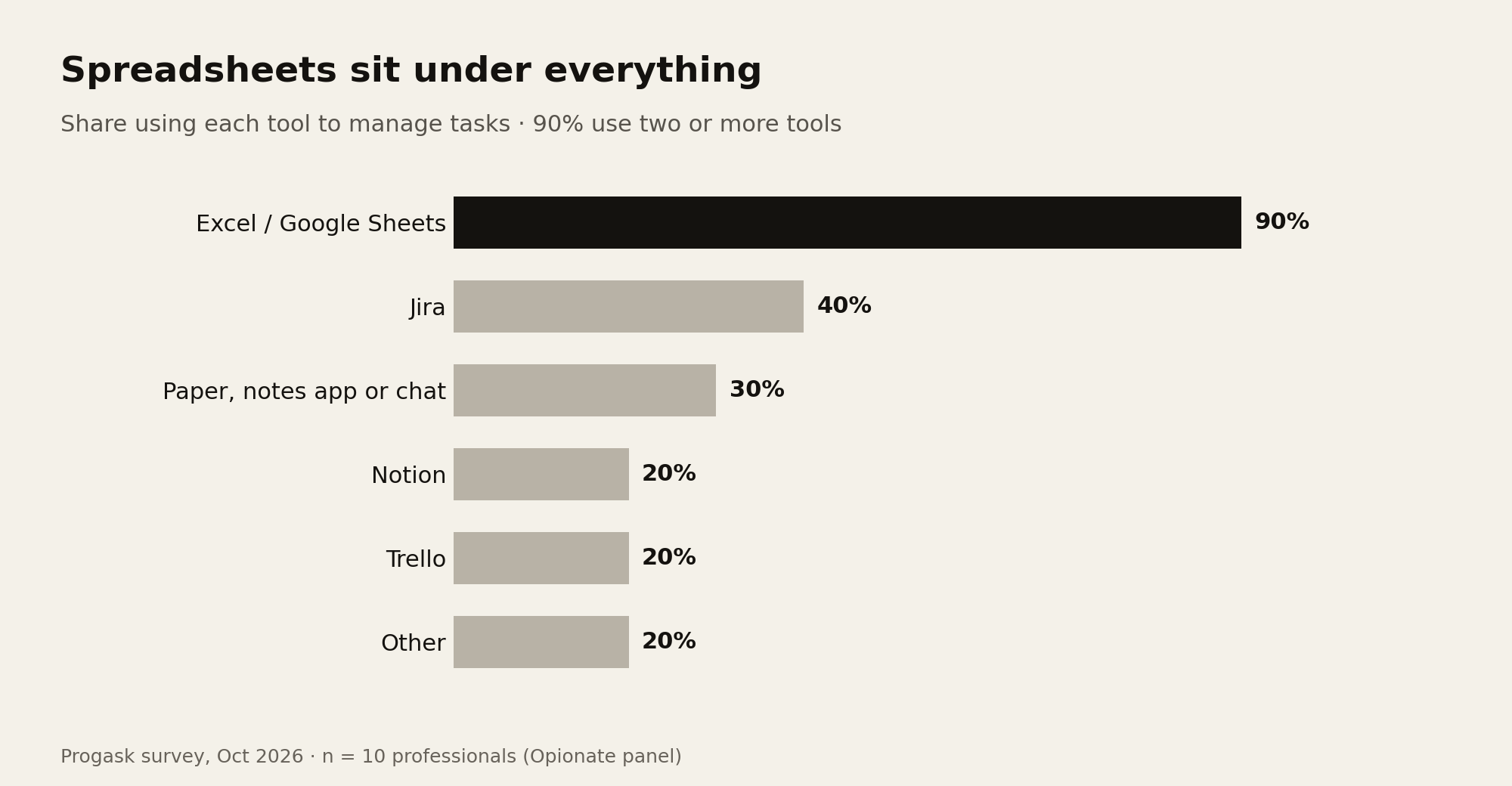
Nine of our 10 respondents use Excel or Google Sheets to manage tasks. Jira came second at 40%, then paper, notes or chat messages (30%), Notion and Trello (20% each). Nobody picked Asana, ClickUp or Monday.
The more interesting number is this: 90% use two or more tools. Only one person ran everything in a single place, and that place was a spreadsheet. Even the Jira users kept a sheet alongside it.
What spreadsheets get right
It's easy to dismiss the spreadsheet as the tool people use before they get a real one. The data suggests the opposite. People keep sheets next to their "real" tools, which means the sheet is doing a job the others aren't.
A few reasons it survives:
- Nothing to set up. Only one person named "the tool takes too much setup or upkeep" as a frustration, and it's easy to see why: a sheet asks for nothing before you start.
- It bends to your process. Add a column, change a colour, sort by anything. One team lead told us their colour-coding made stuck tasks easy to spot, the only early catch in our whole survey.
- Everyone can open it. Clients, other departments and the manager two levels up can all read a sheet without a new login.
- It's the summary layer. When the detailed work lives in Jira or a chat, the sheet is often where someone pulls it together for a report.
Where spreadsheets break
The weakness is the same as the strength: a sheet does exactly what you tell it, and nothing else. It doesn't know what day it is. It doesn't notice a row that hasn't changed in two weeks. It doesn't remind anyone.
One respondent's slip story says it all: the spreadsheet wasn't updated, a deadline was missed, and they found out only after it had passed, by checking the spreadsheet.
The sheet was accurate the whole time. It simply waited for a human to update it and another human to look.
And because most people pair the sheet with something else, they pay for it in switching: 20% named "switching between too many tools" a top-three frustration, and every extra tool is another place where status can drift.
What this means for anyone building a task tool
If your competitor is a spreadsheet, more features won't win. Three things matter more:
- Be as quick to start as a sheet. If the first ten minutes feel like configuration, people go back to the grid.
- Do the one thing a sheet can't: pay attention. Notice time, notice stillness, notice when a plan and reality drift apart.
- Don't become one more tab. Fit into where people already work, or replace a tool rather than adding to the pile.
That's the bar we've set for Progask. It should feel as light as the sheet people already trust, while doing the one thing a sheet never will: knowing what day it is. Give a task an end date and Progask sorts it into Slipped, Now or Ahead by itself. It never changes a date unless you do. And because so much planning now happens in AI chat, Progask meets people there instead of asking them to come to yet another app.
About the survey. In October 2026 we asked 10 people who work with at least two others how they manage tasks. Respondents came from a paid research panel (Opionate) and answered 17 questions, including a short story about the last task that slipped. Ten people is a small group, so read these numbers as early signals, not industry statistics. We plan to run a larger round.
Progask is free during the beta.
Start this week free